
The complete AI workspace
Every app you use connected to an AI assistant
Conversational AI assistants that work across your whole tech stack.
Primary product UI
Connect your stack, ask in plain language, approve what changes
Connect the apps your business already runs on
One assistant across the tools you already use
Every app you use connected to an AI assistant
Conversational AI assistants that work across your whole tech stack.
Guided assistant setup
Three steps from your stack to one surface
Get work done across your stack from one place
Step 1
Connect the apps you already use
Link HubSpot, Slack, Google Sheets, Notion, and 500+ more to one assistant so your tools stay where they are and stop living in separate tabs.
Step 2
Talk to one assistant across all of them
Ask about an invoice, update the CRM, or send a follow-up in plain language. The same conversation can reach whichever connected app the work lives in, without opening each one by hand.
Step 3
Approve what changes before anything runs
See what Pinksheep will touch, which apps it will use, and what it will cost, then say yes. Nothing important writes without your say-so, and you can check the full loop any time.
Built for teams on a real stack
See how support, sales, finance, RevOps, and operations teams get daily work done across their tools from one place.
One job across the apps that hold it
Find stale HubSpot contacts, enrich them, and review before anything changes.
Step 1
Ask Pinksheep to find every HubSpot contact that has not been updated in the last 30 days.
Step 2
Fill in missing company name, role, and location from the other tools you already use.
Step 3
Review the proposed CRM updates and approve them before anything writes.
500+
App connections
Tools you already use
One place
Working surface
Instead of twenty tabs
Your say-so
Before writes
Nothing important runs alone
Minutes
First useful result
After you connect
Control stays with the person doing the work
Nothing runs without your say-so.
01
Talk across your connected stack
Ask for what you need in plain language and the assistant reaches the apps that hold the work, from CRM to inbox to spreadsheets.
02
Stay in the conversation
You keep the business context while the assistant works, so you are never locked out of what is happening.
03
Nothing writes without you
When a change would hit your apps, Pinksheep shows what will change first and waits for your say-so.
04
One history for the team
Approvals, app access, and completed work stay visible in one shared record the whole team can check.
The same workspace on your phone
Approve changes and check history from anywhere.
Use the same connected stack from your phone. Review pending approvals, see what already ran, and keep the day moving without opening twenty apps on a laptop.
Approve or pause writes while you are away from the desk
Check the full activity history from your phone
Get notified when Pinksheep needs your say-so
Keep one shared record for yourself, your team, or the whole business
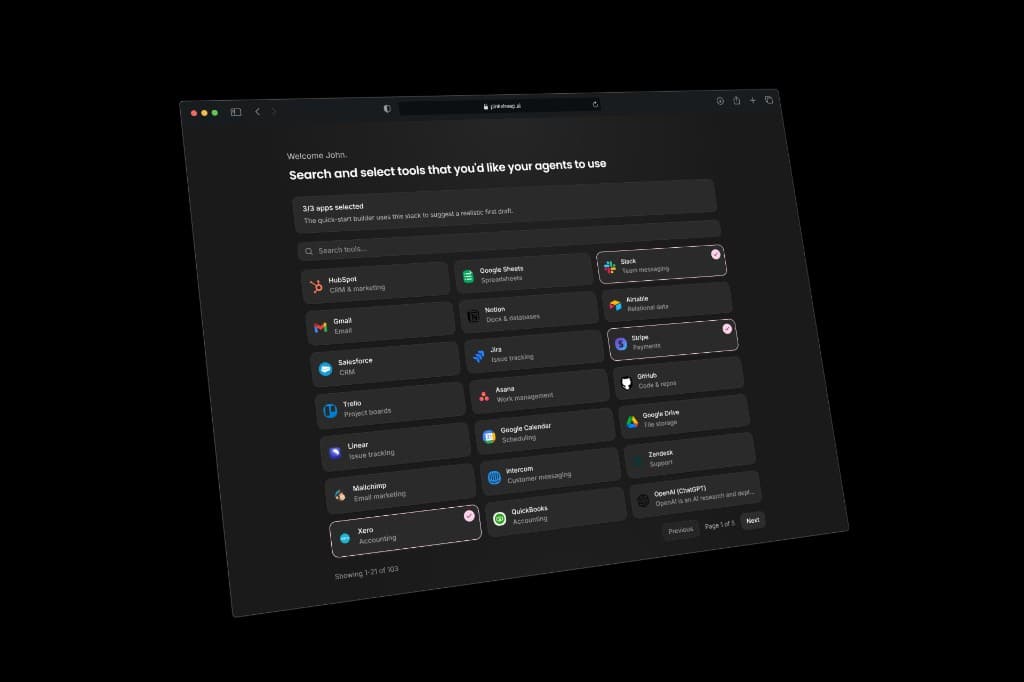
Every tool, connected once
Connect the apps your business already runs on to one assistant.
Link HubSpot, Salesforce, Slack, Notion, Zendesk, QuickBooks, and hundreds more. The apps stay yours. Pinksheep only reaches the ones you choose.
Same controls when you work from Cursor or Claude
Bring your connected stack into the AI tools you already use.
Teams that already live in Cursor or Claude can reach the same connected apps through the Pinksheep MCP server, with approvals, spend limits, and history still in place.
Works with Cursor, Claude Desktop, and other MCP clients
Every action is logged no matter which tool starts it
Spend limits apply across web, mobile, and MCP
Free to connect and use
What you can verify today
Hundreds of app connections, approvals before writes, and a first useful result in minutes.
Connects to 500+ business apps your team already uses.
Nothing important writes without your approval.
Every action is logged and every cost is visible, with spend caps on by default.
Keep reading by team, stack, or plan
See how one assistant works across your stack
These pages cover the product loop, the apps you connect, how teams use Pinksheep day to day, and the controls that stay in place.
Last reviewed 6 May 2026
Run the business from one surface.
Connect the apps your business already runs on to one AI assistant, work across them from a single place, and approve what changes before anything runs. Join the waitlist for early access.
pinksheep · early access